

















Table of Contents
- • AnyMP4 Review Summary
- • About AnyMP4
- • Other opinions about AnyMP4
- • Overview of AnyMP4 Multimedia Software
- • AnyMP4 Review
- • AnyMP4 Video Converter Ultimate Review
- • AnyMP4 Blu-ray Ripper Review
- • AnyMP4 iPhone Data Recovery Review
- • AnyMP4 Pros & Cons
- • AnyMP4 Usage and Features
- • AnyMP4 Subscription and Licensing
- • AnyMP4 Return Policy
- • AnyMP4 Digital Delivery Details
- • AnyMP4 Warranty
- • AnyMP4 Contact Information
- • Where to buy AnyMP4?
- • Conclusion of AnyMP4 reviews & ratings
AnyMP4 Review Summary
AnyMP4 is a mid-tier multimedia software provider offering tools primarily for video conversion, playback, and mobile data recovery. It generally delivers strong performance with wide format support and GPU acceleration but may encounter occasional licensing and subscription management challenges. Its feature set and support tend to meet the needs of Windows and Mac users with moderate technical expertise.
Highlights
- Suitable for users needing multimedia conversion and recovery tools
- Comprehensive software suite including editing, ripping, playback, and screen recording
- Balances fast processing and broad support with some license activation and subscription management limitations
- Overall solid functionality rated 7.0/10 with noted trade-offs
Within the broader multimedia software category, AnyMP4 offers a balanced option alongside specialized alternatives. While not without drawbacks, it remains relevant for its cross-platform capabilities. Readers may refer to the AnyMP4 review for a fuller perspective on its strengths and weaknesses.
About AnyMP4
Managing various multimedia files often requires converting, editing, or recovering data across incompatible devices and formats. This process can be complicated without reliable tools that handle multiple formats efficiently. Users also face challenges like device compatibility and complex license activations.
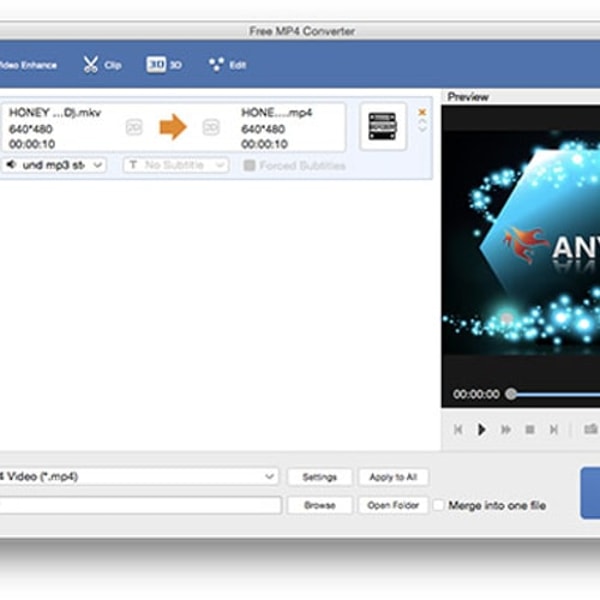
AnyMP4 develops multimedia software solutions focused on video conversion, Blu-ray/DVD ripping, data recovery, and screen recording. Positioned as a mid-tier provider, it offers functional software for Windows and Mac that supports a wide range of formats with GPU acceleration. The suite targets both casual users and content creators needing comprehensive editing and playback tools.
AnyMP4 has received an average rating of 4.0 based on over 200 reviews across platforms like Trustpilot and Google. Users commonly praise its high-quality output and responsive customer support dealing with license and subscription issues. The company has been actively improving its software with support for 8K/4K UHD video and streamlined activation processes.
This overview aims to help users evaluate AnyMP4 for multimedia conversion, playback, and mobile data recovery needs. While its tools perform well, occasional license activation and subscription management challenges remain. For a detailed evaluation, see the AnyMP4 review to assess its fit for your requirements.
Other opinions about AnyMP4
Opinions and insights gathered from trusted review articles and authoritative websites covering AnyMP4.
Overview of AnyMP4 Multimedia Software
AnyMP4 is a software company specializing in multimedia processing tools for Windows and Mac platforms. Originating from Hong Kong, the company focuses on developing video converters, Blu-ray/DVD tools, and mobile data recovery software with a global market reach. The brand is recognized within the software industry for its functionality related to video and audio conversion, editing, playback, and recovery tasks.
AnyMP4 operates primarily through digital downloads available on its official website, providing customer support and software updates online. The company maintains a mid-sized structure with multiple bundled software products and features including GPU acceleration and AI-enhanced processing. Its suite supports a wide range of multimedia formats and devices, aiming to address compatibility and data management challenges for users worldwide.
This AnyMP4 Review outlines the company’s approach to delivering comprehensive multimedia software solutions that include fast conversion speeds, screen recording, and mobile data transfer tools. While the brand focuses on ease of use and format versatility, it also manages licensing activation and subscription services under its operational model. Overall, AnyMP4 functions as a mid-tier provider offering tools suitable for multimedia content creation, conversion, and recovery.
AnyMP4 Review
AnyMP4 specializes in multimedia software solutions designed to meet the needs of Windows and Mac users. The brand focuses on video conversion, DVD and Blu-ray ripping, and mobile data recovery tools. It aims to provide efficient and user-friendly software with broad format compatibility. Customers often recognize the brand for its reliable performance and customer support.

The product range includes video converters, Blu-ray/DVD playback and ripping tools, screen recorders, and mobile data recovery applications. AnyMP4’s software supports high-resolution formats and leverages GPU acceleration for fast processing. Positioned as a mid-tier multimedia provider, the brand emphasizes ease of use and comprehensive features across its suite.
AnyMP4 Highlights
- High-quality output and conversion performance
- Responsive customer service
- Wide format support
- Feature-rich software tools
- Efficient license support
AnyMP4 Video Converter Ultimate Review
Video Converter Ultimate offers fast and versatile video format conversion with support for 8K, 5K, and 4K UHD videos. It utilizes GPU acceleration to enhance processing speeds, making it suitable for users needing efficient conversions.

The software supports both Windows and Mac platforms, ensuring compatibility across popular operating systems. It provides a balance between performance and broad format support within AnyMP4's product range.
Price $18.75 • anymp4.com
AnyMP4 Blu-ray Ripper Review
Blu-ray Ripper enables users to convert Blu-ray discs into digital formats compatible with a variety of devices. It supports region-free playback and ripping, allowing flexible media access across different regions.

This software is designed for consumers seeking to efficiently digitize and edit their Blu-ray content. It provides tools to manage media conversion with a focus on versatility and compatibility.
Price $30 • anymp4.com
AnyMP4 iPhone Data Recovery Review
iPhone Data Recovery is designed for users who need to recover lost data from iOS devices due to accidental deletion or system errors. The software focuses on safe and efficient data retrieval to minimize the risk of further data loss.

It integrates well with other AnyMP4 mobile tools, providing a more comprehensive approach to device management. This integration helps streamline data recovery alongside other mobile utility functions.
Price $28 • anymp4.com
AnyMP4 Pros & Cons
AnyMP4 offers a robust multimedia software suite known for supporting a wide range of video and audio formats, including 8K and 4K UHD. Its high conversion and ripping speeds are enhanced by GPU acceleration, and the software provides broad compatibility across Windows and Mac platforms. Additional features like AI-powered video enhancement, region-free Blu-ray/DVD ripping, and a comprehensive set of tools for editing, screen recording, and mobile data transfer make it versatile for various multimedia needs.
Users should be aware of some recurring issues, such as license activation difficulties following operating system reinstalls or hardware changes, which can require customer support intervention. Subscription auto-renewal management may also be confusing or problematic for some. Additionally, screen capture functionality can be limited during full-screen Blu-ray playback. Overall, the software balances extensive functionality and performance with occasional challenges in license and subscription management.
- • Wide format support including 8K/4K UHD
- • High conversion and ripping speed with GPU acceleration
- • Comprehensive multimedia tools suite
- • Region-free Blu-ray/DVD playback and ripping
- • AI-powered video enhancement features
- • Supports Windows and Mac platforms
- • Responsive license reactivation support
- • License activation issues after OS or hardware changes
- • Subscription auto-renewal management challenges
- • Screen capture limitations during full-screen Blu-ray playback
AnyMP4 Usage and Features
AnyMP4 software features user-friendly interfaces that allow files to be dragged and dropped for tasks such as conversion, ripping, or data recovery. It utilizes GPU acceleration to speed up processing, particularly for high-resolution video formats. The software suite supports both Windows and Mac platforms and includes tools designed to address a variety of multimedia processing needs.
Key features include support for 8K, 5K, and 4K UHD video formats, region-free Blu-ray and DVD tools, multi-language localization, and comprehensive format compatibility enhanced by AI technology. These capabilities enable users to manage and optimize their multimedia workflows efficiently across different devices and formats.
AnyMP4 Subscription and Licensing
AnyMP4 offers licensing options including monthly, lifetime, and multi-user licenses. Subscriptions feature auto-renewal, requiring users to carefully manage their renewal settings. License activation is done online, and customer support is available to assist with reactivations in cases of hardware changes or system reinstallations.
License activation is managed via online software with support for license reset. Subscription auto-renewal requires users to monitor their accounts to avoid unintended charges. A 30-day money-back guarantee is provided, and user accounts allow management of licenses and software downloads to ensure continued access and reduce potential issues.
AnyMP4 Return Policy
AnyMP4 offers a 30-day money-back guarantee for returns. No specific fees related to returns are mentioned. Return requests must meet refund eligibility criteria, though details are limited.
Exclusions to the return policy are not clearly disclosed. Limited information is publicly available about the full terms. Customers are advised to review available policy details before purchase.
AnyMP4 Digital Delivery Details
Products are delivered exclusively through digital downloads, available worldwide without regional restrictions. There are no physical shipments involved in the delivery process. Access to the purchased software or service is provided online immediately after purchase.
Download and activation can be completed instantly following payment confirmation. No tracking information is provided as there is no physical shipping. There are no additional shipping costs or logistics since delivery is entirely digital.
AnyMP4 Warranty
Only limited information is provided regarding the warranty, with a 30-day money-back guarantee mentioned as the primary refund policy. No detailed warranty terms, exclusions, or specific claim procedures are publicly disclosed by the brand. Customers should be aware of the minimal explicit warranty information available at the time of purchase.
Additional assistance is available through customer service for issues related to license and activation. This support complements the refund policy but does not replace formal warranty coverage. Prospective users are advised to consider these factors when evaluating the product's warranty scope.
AnyMP4 Contact Information
Users can reach AnyMP4 support primarily through email and online contact forms for assistance with license activation, subscription billing, technical issues, and product usage. These channels are the main ways to contact the support team.
- Email: [email protected]
- Facebook: AnyMP4
Phone and live chat support are not available. Response times are typically within one week. Users are encouraged to contact support for help with their inquiries.
Where to buy AnyMP4?
AnyMP4 products are officially available for purchase through their website, where users can create accounts for license management and access customer support, ensuring a structured and clear policy framework. When obtaining software from anymp4.com, buyers can expect immediate digital downloads and assistance with licensing issues. It should be noted that some users may encounter differences if purchasing through third-party marketplaces, as these channels may have varying reliability and support options compared to the official source.
Conclusion of AnyMP4 reviews & ratings
AnyMP4 plays a notable role in multimedia software by offering versatile tools for video conversion, playback, and mobile data recovery. Their software supports high-resolution formats and benefits from GPU acceleration, enhancing speed and compatibility. Users can find a range of solutions at anymp4.com, which serves as a comprehensive resource for downloads and support.
Exploring the available features can provide insight into whether the suite fits specific multimedia needs, and readers may revisit this page for details and updates. The AnyMP4 review offers balanced information to help users make informed decisions without pushing urgency or guarantees.
Editorial notes reflect aggregated buyer feedback and our independent editorial review of publicly available information. They are for informational purposes only and do not constitute endorsements. Purchases are made at your own discretion, and we are not responsible for transactions or outcomes related to this store. Experiences may vary. This content is assisted by AI and reviewed by our editorial team. While we strive for accuracy, AI-supported information may not always be 100% precise, so please verify any critical details.

